Showing posts with label Git. Show all posts

Thursday

How to install and configure Git(2.19.0) and GitHub on Windows

Install git on your desktop:
1. Go  https://git-scm.com/  >> click Downloads >> click for windows.
2. Run the downloaded file.
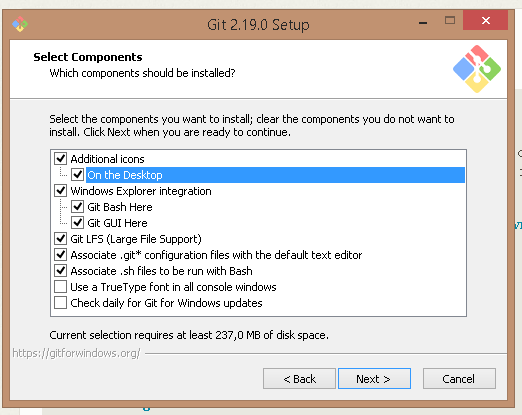
3. Click next, select below components, then click next.


Create repository on GitHub:
1. Create an account for GitHub. https://github.com/
2. Sign in to GitHub with your user.
3. Click to new repository:


You can select language from >> 'add .gitignore' section


Then click 'Create repository.'


You can find the link for your repository as follow:


Configure  git and github:
1. Create a folder named as 'git'. C:\git
2. Then open git bash.
3. Lets pass to out folder directory.
 'cd /C'


'cd git/'


git config --global user.name "Your github name"


git config --global user.email "your email adress"


git clone (your repository adress - i show you up how to copy it)


TestGit folder has been copied to our folder:


How to upload files to GitHub:


1.Create  a file:


2. Write something to file then save.


3.
git add (file names)


4.
git commit - m "(committed message)" filename


5.
git push -u origin master
>> at first time it will ask github user-password.


6. Go to github then refresh page.


Change file and upload again:
1. Change text in the file and save it.


2.
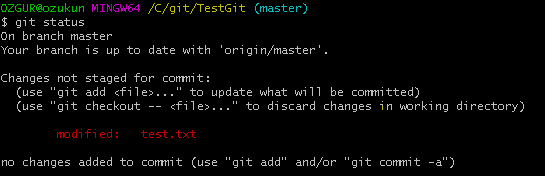
git status


3.
git commit - m "(committed message)" filename


4.
git push -u origin master


5. Go to your github page.